Tower C2
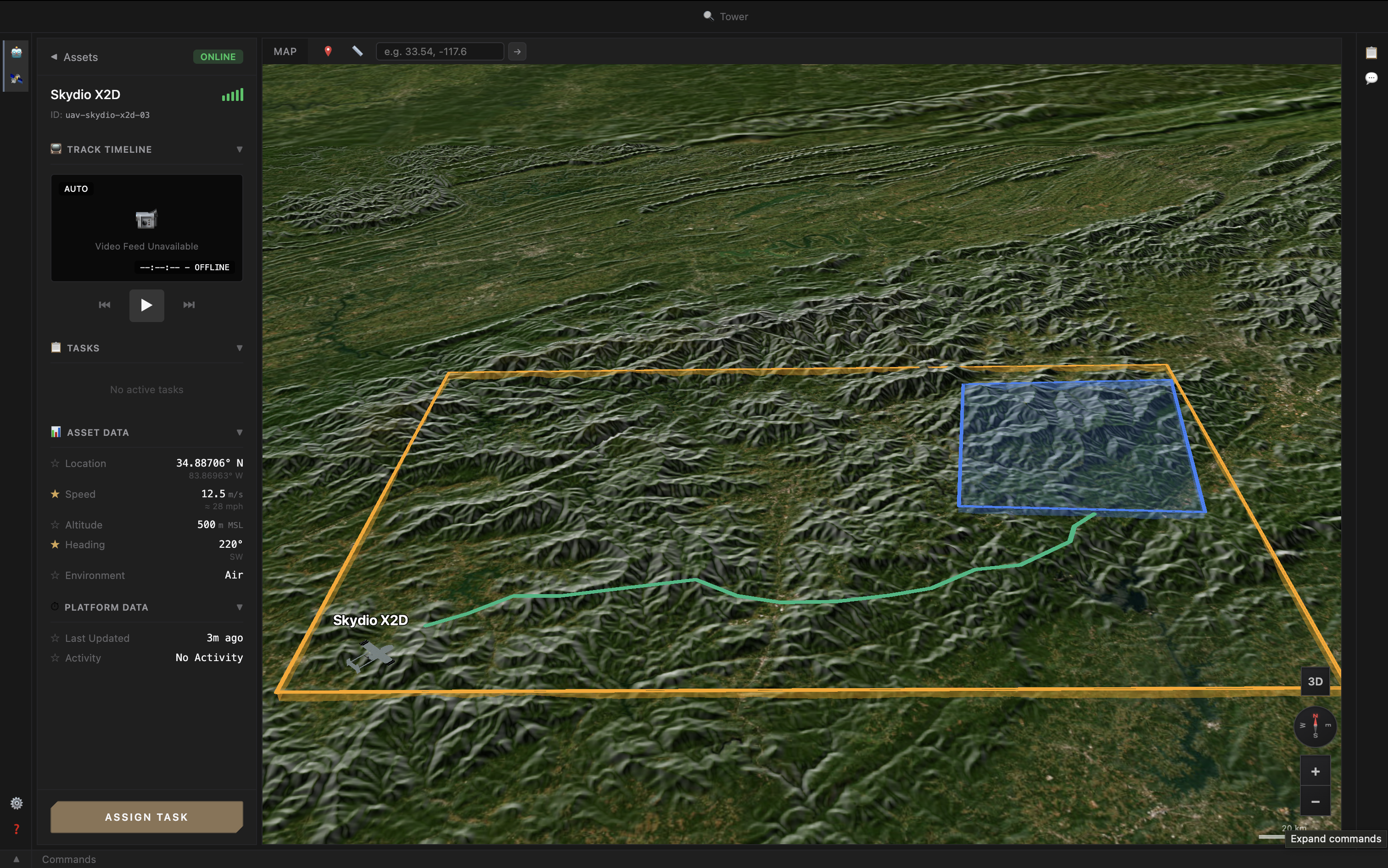
Tower is an open-architecture command and control system for heterogeneous robotic fleets. It pairs a React PWA operator UI with a Go tower-server that bridges vehicles over the pidgin protocol. Vehicles share one operator surface, but no operator action ever bypasses what the receiving vehicle says it can do.
Most fleet software picks one of two failure modes. Single-domain tools don't talk to each other, since a drone GCS can't fly a ground robot and a marine console can't visualize a UAV, so mixing platforms means juggling separate apps and incompatible data formats. Unified dashboards go the other way, flattening every vehicle into a lowest-common-denominator interface, and trade that friction for silent execution failures: a ground rover quietly accepting a "take off" command, or a stationary manipulator queried for GPS waypoints, with no warning until something physically goes wrong. Tower avoids both: one operator surface, with every command checked against what the receiving vehicle actually supports before it's forwarded.
The Operator Surface
The Tower UI is built for operators running mixed fleets, not vehicle-specific consoles bolted onto each other. Several things happen in one shared scene rather than one per platform. 3D mission planning covers geospatial waypointing, area coverage, and multi-vehicle coordination across air, ground, and stationary assets in a single planner. Fleet monitoring surfaces live telemetry from every connected vehicle on one map and in one status panel, with platform-specific detail exposed through extensions rather than hidden behind generic widgets. Command panels are capability-aware: the UI renders only the controls each selected vehicle has actually advertised at runtime, so an operator never sees a button that maps to an action the receiving vehicle can't accept, and the server backs that up with a hard validation step while the UI just consumes the result. An LLM chat panel puts that same fleet and mission context behind natural language — today read-only (ask about vehicles, zones, coverage, conflicts), with all reasoning done in deterministic code and the model only formatting or parsing. As the assistant grows into proposing actions, its proposals will be gated by the same capability data that gates the human operator, so the legibility guarantees carry over.
The result is a tighter operator experience: one map, one mission timeline, and one command surface across heterogeneous assets, without pretending that a stationary hub can fly or that a drone can charge a partner.
tower-server: Translation and Validation
┌──────────────┐    UDP multicast    ┌──────────────┐    WebSocket     ┌──────────────┐
│   Vehicles   │ ◀─────────────────▶ │ tower-server │ ◀───────────────▶│  Operator UI │
│   protobuf   │                     │     (Go)     │   JSON frames    │   (Browser)  │
└──────────────┘                     └──────────────┘                  └──────────────┘
tower-server is the bridge between the multicast protobuf world the vehicles speak and the WebSocket JSON world the UI consumes. It owns four responsibilities. Protocol translation decodes pidgin core and extension payloads from protobuf into JSON for the UI, and encodes operator commands the other direction, keeping the protobuf runtime and per-extension binary handling out of the browser. Telemetry aggregation maintains the fleet snapshot from incoming VehicleTelemetry and Heartbeat messages, fans it out to connected operator clients, and publishes the welcome message that bootstraps each session with the current fleet, manifests, and available extensions. Command validation cross-references every operator command against the receiving vehicle's advertised capabilities before forwarding it; out-of-capability commands are rejected at the server, not the vehicle, and the rejection reason flows back to the UI as structured data the operator can act on. Command routing delivers validated commands to the addressed vehicle and surfaces the lifecycle (accepted, rejected, timeout, completed, failed) back to the operator who issued them.
That split is what lets the UI stay clean: it doesn't see protobuf, doesn't manage extension codecs, and doesn't validate commands itself. It asks the server what's possible and renders accordingly. tower-server is one bridge implementation; because pidgin stands on its own, other autonomy stacks, GCSes, or middlewares can adopt the protocol without buying into Tower.
Designed for Heterogeneous Fleets
The motivating workload is mixed-domain operations where each platform has a meaningfully different command surface and operational envelope. A last-mile delivery scenario exercises the boundary cases the architecture was built for: ground rovers navigating sidewalks and parking lots, aerial drones handling rooftop and hard-to-reach drops, and stationary hubs managing handoff and charging all share some commands (mission start/stop, waypoint queue, status reporting) but disagree on others (altitude, payload manipulation, charge state).
Operators see one map, one mission timeline, and one command surface across all three classes. Vehicle differences are surfaced where they're actionable; vehicle commonalities are pooled where they're useful. Adding a new platform class is mostly extension-mapping work at the edge rather than central bridge maintenance in the middle. See the pidgin integration contract for what that looks like in practice.
Where Tower Sits in the Stack
Tower is the cross-platform half of our composition story: it composes vehicles into a fleet through the protocol seam. The within-platform half is the SPAR authority boundary on each vehicle. Vehicles plug into Tower by publishing a pidgin extension payload at one end of the runtime; SPAR enforces the autopilot-facing contract at the other. The two boundaries are independent: you can adopt pidgin without SPAR, or SPAR without Tower.
Dive deeper
Read the pidgin protocol spec or the UI architecture overview.