System Design
System design is the top-level view of a robot: what the major pieces are, who owns what, how they pass information, and why they run at different rates. If you can look at a robotics stack and explain the boundary between sensing and estimation, how planning hands off to control, and what happens when data goes stale, you can reason about the system before reading a line of code.
1. A Robot Is Not One Loop
The first mental shift in robotics system design is giving up the idea that a robot is one big loop that reads sensors, makes a decision, and sends commands. Real robots are usually several loops running at different rates because different parts of the problem live on different time scales.
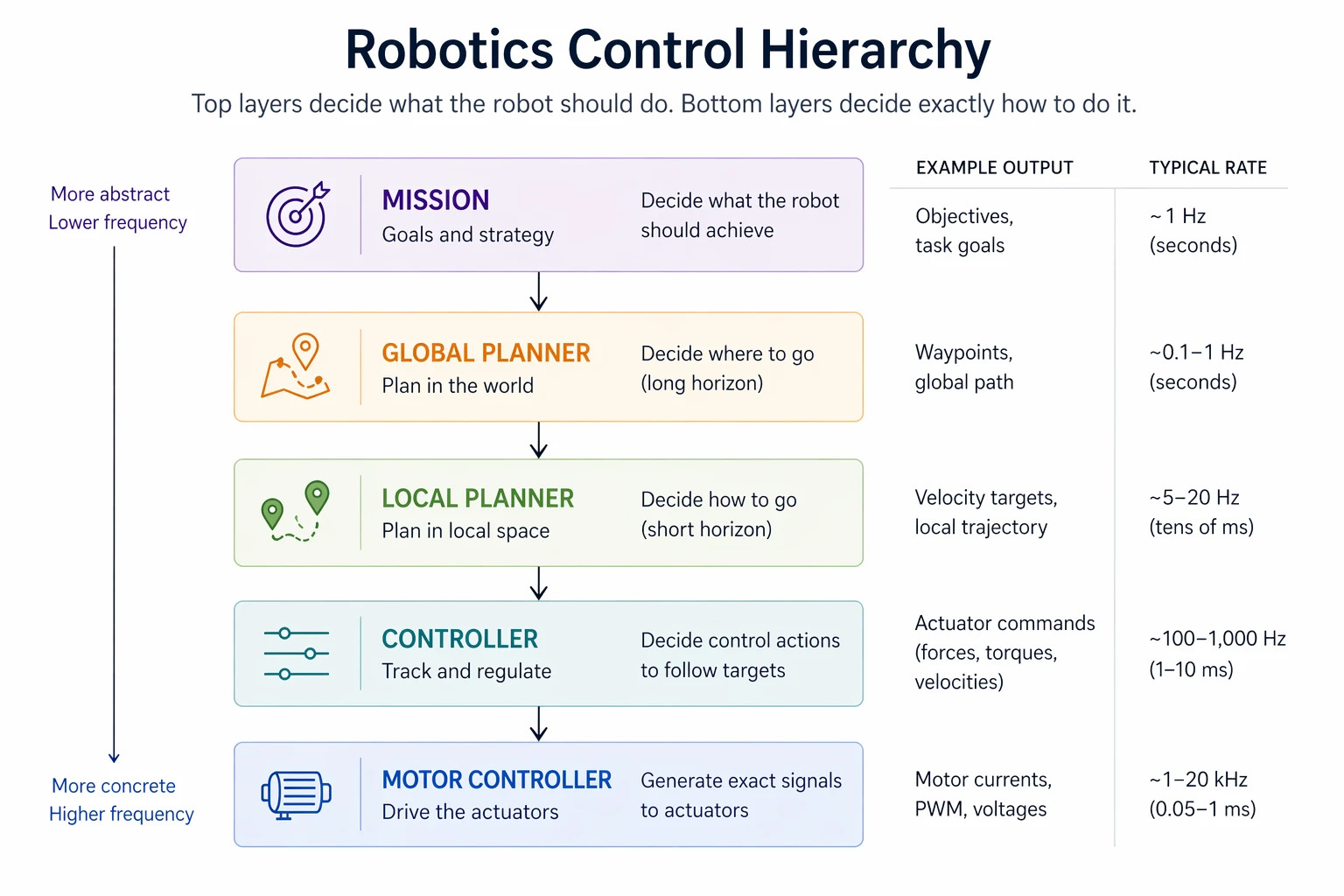
A robot is rarely a single sense–think–act loop. Different parts of the problem live on different time scales: mission logic updates every second or so, planners run at a few hertz, perception runs at sensor rate, estimators track the dynamics, and controllers close the loop at high frequency. Slower layers decide what to do; faster layers decide how.

The exact rates vary across robots, but the overall pattern does not: control runs fastest, estimation follows the dynamics, perception is bounded by sensors and compute, and planning and mission logic run more slowly because they reason over longer horizons. Those differences come from physics, latency, and system requirements, not coding style.
This is also why you can't just call the slow layer from inside the fast one. A controller running at 1 kHz cannot block on a 30 Hz perception update — it would miss 32 of its own deadlines waiting. The usual pattern is a shared latest-value slot: the slow producer writes whenever it has something new, the fast consumer reads the most recent value without blocking, and a timestamp lets the consumer notice when the value is stale.
struct Stamped { Pose value; double t_sec; };
std::atomic<Stamped> latest_pose; // written by perception, read by controller
// Perception thread @ 30 Hz
void perception_loop() {
while (running) {
Pose p = run_perception();
latest_pose.store({p, now()});
sleep_until_next_tick(30);
}
}
// Controller thread @ 1 kHz
void controller_loop() {
while (running) {
Stamped s = latest_pose.load(); // never blocks
if (now() - s.t_sec > 0.1) enter_safe_mode(); // freshness check
else send_command(compute(s.value));
sleep_until_next_tick(1000);
}
}
The controller never waits on perception, but it also never silently uses a half-second-old pose — the timestamp is what makes the decoupling safe.
Two distinctions matter early. Perception is not estimation: detecting a lane marker is different from estimating vehicle pose. And planning is not control: deciding where to go is different from generating the fast actuator commands that make the robot follow that decision.
2. Interfaces Are The Real Architecture
System design is mostly boundary design. A module stays swappable only if its inputs are explicit, its outputs are typed, and its responsibilities don't leak into neighboring layers.
Good:
camera -> perception -> planner -> controller
Bad:
camera -> planner
UI -> controller
controller -> map internals
Good boundaries let you replace a camera, planner, or estimator without rewriting the rest of the stack. Bad boundaries create hidden coupling: a planner reaches into sensor internals, a UI writes actuator commands directly, or a controller depends on map-building details it should never know about. This is why robotics diagrams matter. They are not decoration; they expose ownership boundaries.
At the code level, those same boundaries are function signatures. The planner asks for exactly what it needs and nothing else:
# Clean — depends on a typed world model.
def plan(world: WorldModel, goal: Goal) -> Trajectory: ...
# Leaky — depends on three layers the planner should never know about.
def plan(world, camera_driver, imu_serial_port, ros_node): ...
The leaky version is no longer a planner — it's a planner-plus-half-the-driver-stack, and swapping the camera or rewiring the IMU now breaks the planning logic. The clean version doesn't care where its WorldModel came from: a stereo camera, a lidar, a simulator, or a recorded log. That's the same property that makes progressive testing tractable — the planner that runs in SIL is literally the same planner that runs on the robot.
3. Rate, Latency, And Freshness Budgets
Once the modules are separated, the next question is not just what talks to what, but how fast and how stale is still acceptable. Every important module has both a nominal rate and a latency budget.
| Module | Typical Rate | If Stale... |
|---|---|---|
| Controller | ~1 kHz | Tracking degrades immediately |
| Estimator | ~100 Hz | Downstream state becomes wrong |
| Perception | ~10-30 Hz | World model goes stale |
| Planner / mission | ~1-5 Hz | Robot can often coast briefly |
A 1 kHz controller should not block waiting on a 30 Hz perception output. A planner can update slowly as long as a faster lower layer can keep the robot stable in the meantime. A stale pose estimate, on the other hand, can poison everything downstream. In robotics, a perfect answer that arrives too late is often worse than a rough answer that arrives on time.
4. Design For Degraded Modes
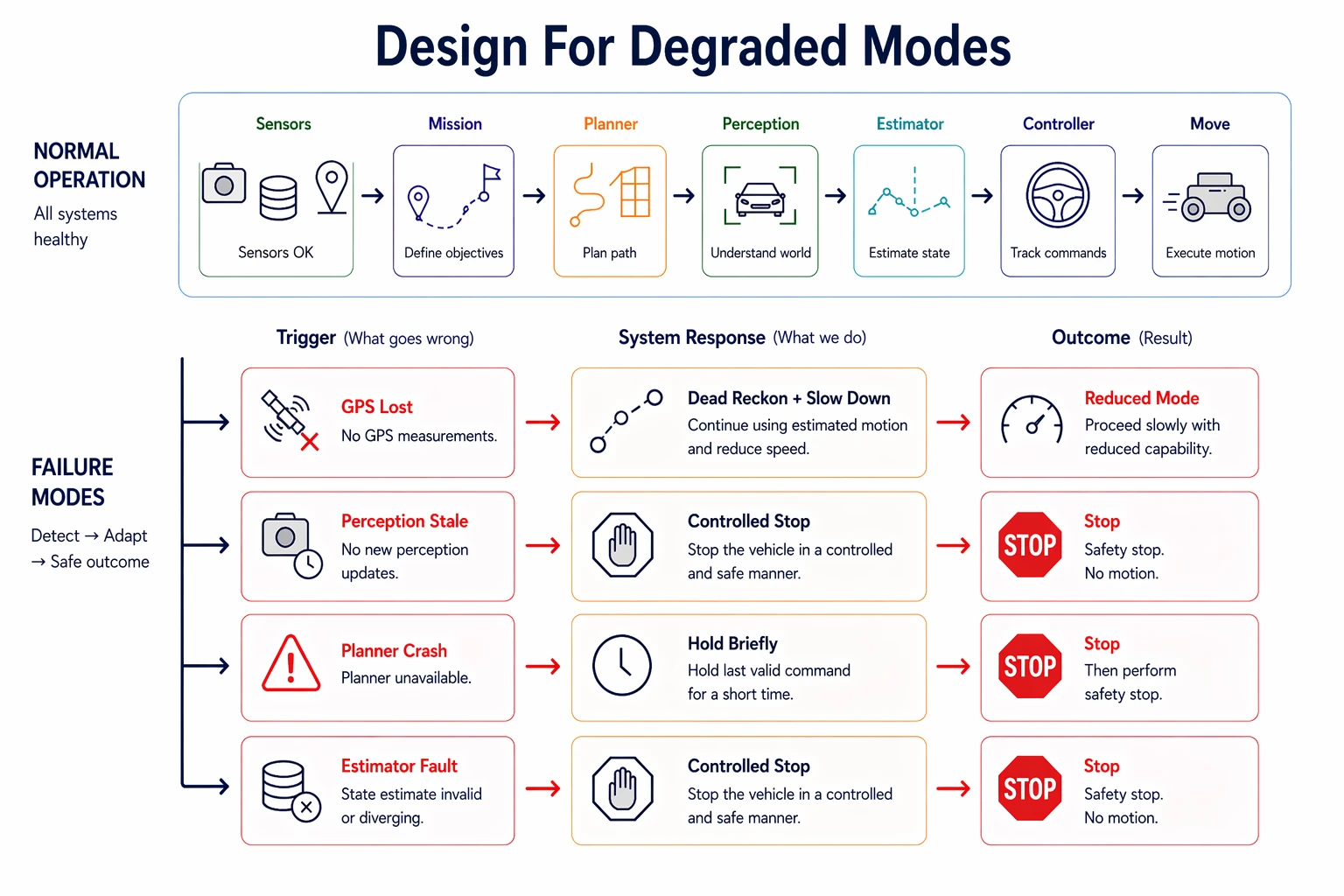
The final question in any system design is not just "how does this work when everything is healthy?" but "what happens when part of it breaks?" Real systems need an answer for dropped sensors, delayed perception, crashed planners, and stale state.

This is where safety authority becomes explicit. A well-designed system is clear about which module can command a stop, which inputs are optional, and what to do when something fails hard enough to need a fallback. Some faults should trigger a controlled stop; others should degrade performance while keeping the robot stable. You can't prevent all failures. The goal is that when they happen, the system does something predictable.
One concrete example makes the interaction between layers easier to see. Picture a small indoor delivery robot moving medicine between rooms in a hospital:
| Module | Input | Output | Rate | If It Fails... |
|---|---|---|---|---|
| Mission manager | operator request, task queue | next delivery goal | 1 Hz | robot stops taking new jobs |
| Planner | map, current pose, goal | short-horizon path | 5 Hz | robot can briefly hold last safe plan |
| Perception | depth camera, lidar | obstacle tracks, free space | 15 Hz | world model goes stale quickly |
| Estimator | wheel odometry, IMU, landmarks | robot pose and velocity | 100 Hz | every downstream decision gets worse |
| Controller | latest pose, target trajectory | wheel velocity commands | 200 Hz | tracking degrades immediately |
When everything is healthy, the mission manager picks the next room, the planner turns that into a path through the hall, perception marks carts and people as obstacles, the estimator keeps the robot localized, and the controller tracks the path.
Now break one thing: the depth camera freezes for 300 ms. A well-designed system does not let that failure blur across the whole stack. Perception stops publishing fresh obstacle updates. The planner can keep its last path for a moment, but only within a freshness budget. The controller keeps running from the latest valid trajectory instead of blocking. If perception stays stale past the allowed timeout, safety authority escalates: either the planner commands a stop because the world model is stale, or a supervisor module forces safe mode directly. That's system design in practice: not just the boxes, but who can keep going, for how long, and who gets to say stop.
Assignment
Apply all four sections at once: the Air Traffic Control Tracker — a Python project that fuses radar (50 Hz, noisy) with a GPS transponder (5 Hz, accurate) to track aircraft through 3D airspace and keep working when sensors fail. The sensor processes, Kalman filter, and visualization are provided; you implement one method, tick(), in one file. Six graded scenarios each test a specific failure mode explicitly — blocking on a slow sensor, hardcoding rate assumptions, staying latched in lost mode, and more.
Go to gtcloudrobotics/air-traffic-control-tracker, click Use this template to make your own copy, then clone and push. The autograder runs on every push; you'll see pass/fail in the Actions tab. Same path for everyone — enrolled GT students just send me your GitHub username at the start of the semester so I can match your repo to your grade.